- CloudFormation is a declarative way of outlining your AWS Infrastructure, for any resources (most of them are supported).
- For example, within a CloudFormation template, you say:
- I want a security group
- I want two EC2 instances using this security group
- I want an S3 bucket
- I want a load balancer (ELB) in front of these machines
- Then CloudFormation creates those for you, in the right order, with the exact configuration that you specify
Benefits
Infrastructure as code
- No resources are manually created, which is excellent for control
- Changes to the infrastructure are reviewed through code
Cost
- Each resources within the stack is tagged with an identifier so you can easily see how much a stack costs you
- You can estimate the costs of your resources using the CloudFormation template
- Savings strategy: In Dev, you could automation deletion of templates at 5 PM and recreated at 8 AM, safely
Productivity
- Ability to destroy and re-create an infrastructure on the cloud on the fly
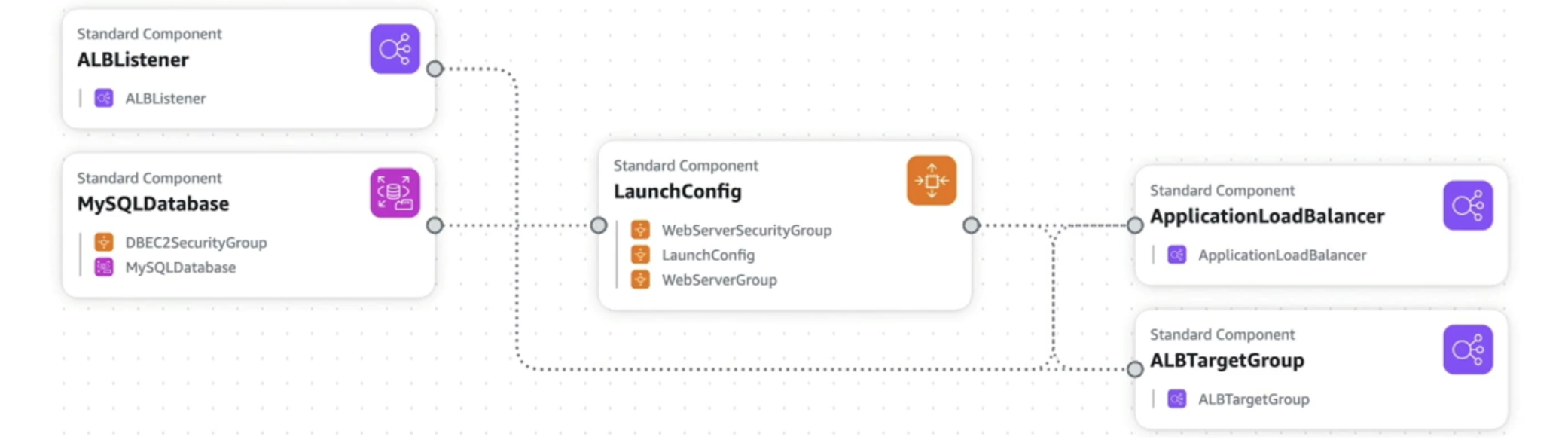
- Automated generation of Diagram for your templates!
- Declarative programming (no need to figure out ordering and orchestration)
Don't re-invent the wheel
- Leverage existing templates on the web!
- Leverage the documentation
Supports (almost) all AWS resources:
- Everything we'll see in this course is supported
- You can use "custom resources" for resources that are not supported
CloudFormation + Infrastructure Composer
- Example:WordPress CloudFormation Stack
- We can see all the resources
- We can see the relations between the components